

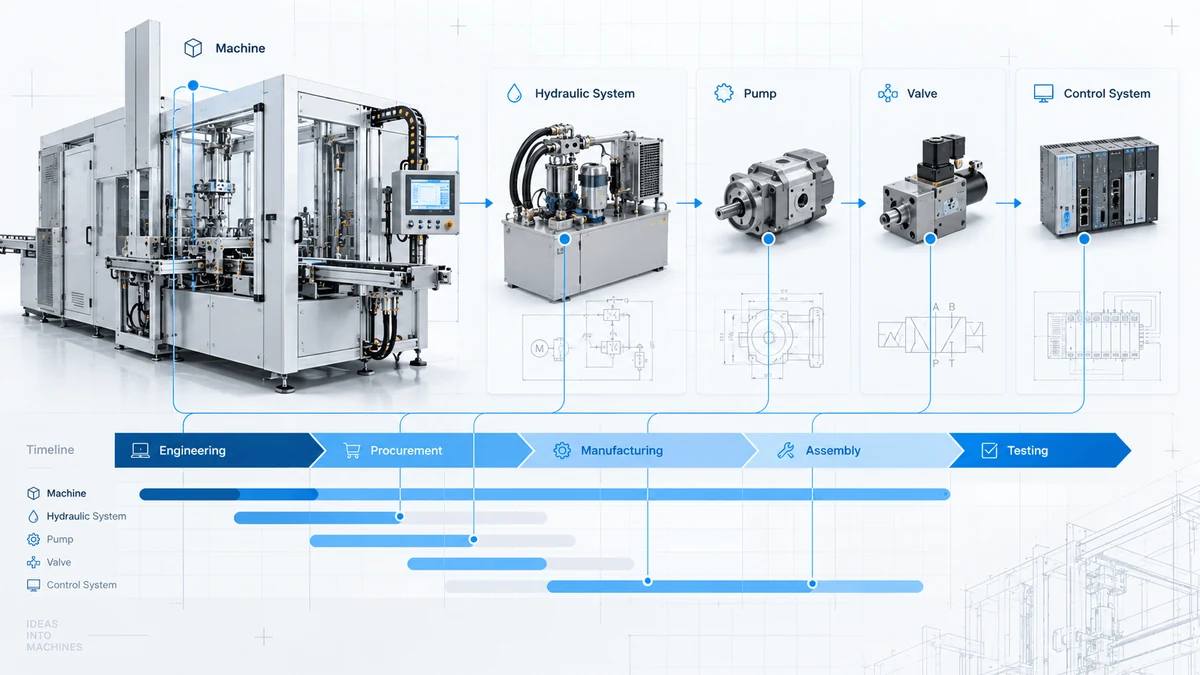
A custom machine rarely moves through engineering, procurement, manufacturing and testing in a neat sequence. One assembly is still being designed while parts for another have been ordered. Manufacturing starts on released drawings, software development moves forward, and the installation team needs to know what will be ready next.
For custom machinery project planning, the difficult question is often not simply “Which tasks are due this week?” It is “Which work belongs to which part of the machine, and what does that mean for the readiness of the product we are delivering?”
This guide uses a small hydraulic-system example to explore a practical way to connect a product structure with work phases and a project timeline.
Why engineering-to-order project planning is different
In repeat manufacturing, the product design and production process are often relatively stable. Engineering-to-Order (ETO) projects start with a customer-specific requirement, so assemblies, interfaces, purchased parts and approval steps can differ from one order to the next.
Common planning situations include:
- Engineering updates an interface after procurement discussions have begun.
- A purchased component remains outstanding while other parts of the assembly are finished.
- Manufacturing is waiting for a specific drawing release, not for “engineering” in general.
- Project reviews combine schedule updates with a bill of materials, supplier messages and status spreadsheets.
These are not isolated scheduling issues. They reflect a deeper coordination problem: work is carried out by disciplines, but the customer receives a product. A useful planning model must keep the connection visible.
Start with the machine and its assemblies
The Product Breakdown Structure (PBS) answers one foundational question: What are we building?
For a simplified custom machine, the product structure might look like this:
Custom Machine
├── Hydraulic System
│   ├── Pump
│   └── Valve
└── Control System
    └── Controller
The hierarchy makes the physical or deliverable context clear. The Pump belongs to the Hydraulic System, which belongs to the Custom Machine. The structure can be extended to whatever level is useful for project control.
However, the PBS alone does not tell us whether the Pump has been designed, purchased or tested. It also does not tell us when the Hydraulic System will undergo its own assembly or manufacturing work.
That leads to a second dimension: the work required to create and deliver those product elements.
Plan the work phases without losing product context
Different components require different work. A purchased valve might need procurement and inspection. A custom pump assembly might require design, procurement and testing. A controller could also involve software work.
Here is an illustrative phase assignment, not a universal project template:
| Product element | Relevant work phases |
|---|---|
| Pump | Engineering, Procurement, Testing |
| Valve | Procurement, Testing |
| Controller | Engineering, Procurement, Software, Testing |
| Hydraulic System assembly | Its own Manufacturing or Assembly phase |
The assembly-level phase is especially important. Work can happen on an assembly itself, while its child components have their own phases. Treating everything as a flat task list makes it harder to understand those levels together.
There are two familiar approaches to organizing the task hierarchy:
Product-first: put Engineering, Procurement and Testing tasks underneath each component. The product hierarchy is easy to follow, but procurement activity becomes spread across many component branches.
Phase-first: group tasks under Engineering, Procurement and Testing. Teams can view a discipline’s work together, but Pump-related tasks appear in several branches. To review one component, its work needs to be brought back together.
Both approaches can be supplemented with codes, custom fields and grouped reports. The challenge is whether the relationship remains intuitive while people are planning and updating work, rather than only when a special report is generated.
A project-review example: procurement for the pump is still open
Assume that the Pump’s engineering phase is marked complete. Procurement remains open, and testing is planned for a later period.
At the next project review, the team needs to understand four things:
- Where does this pump sit in the machine?
- Which of its work phases are complete, open or planned?
- When is each phase scheduled?
- What work is taking place at the parent Hydraulic System level?
A task marked “Procure Pump — open” is useful, but it does not automatically show the broader product context. An expected delivery date in an ERP system is useful too, but it is not a substitute for viewing the work within the machine’s plan.
A product-centered approach retains the hierarchy and attaches the work directly to the relevant element. The team can review the open phase without losing sight of the component and its assembly. Whether it threatens a milestone still requires schedule analysis and engineering judgment; an open phase alone is not an automatic delay forecast.
How PHASI connects product structure and work layers
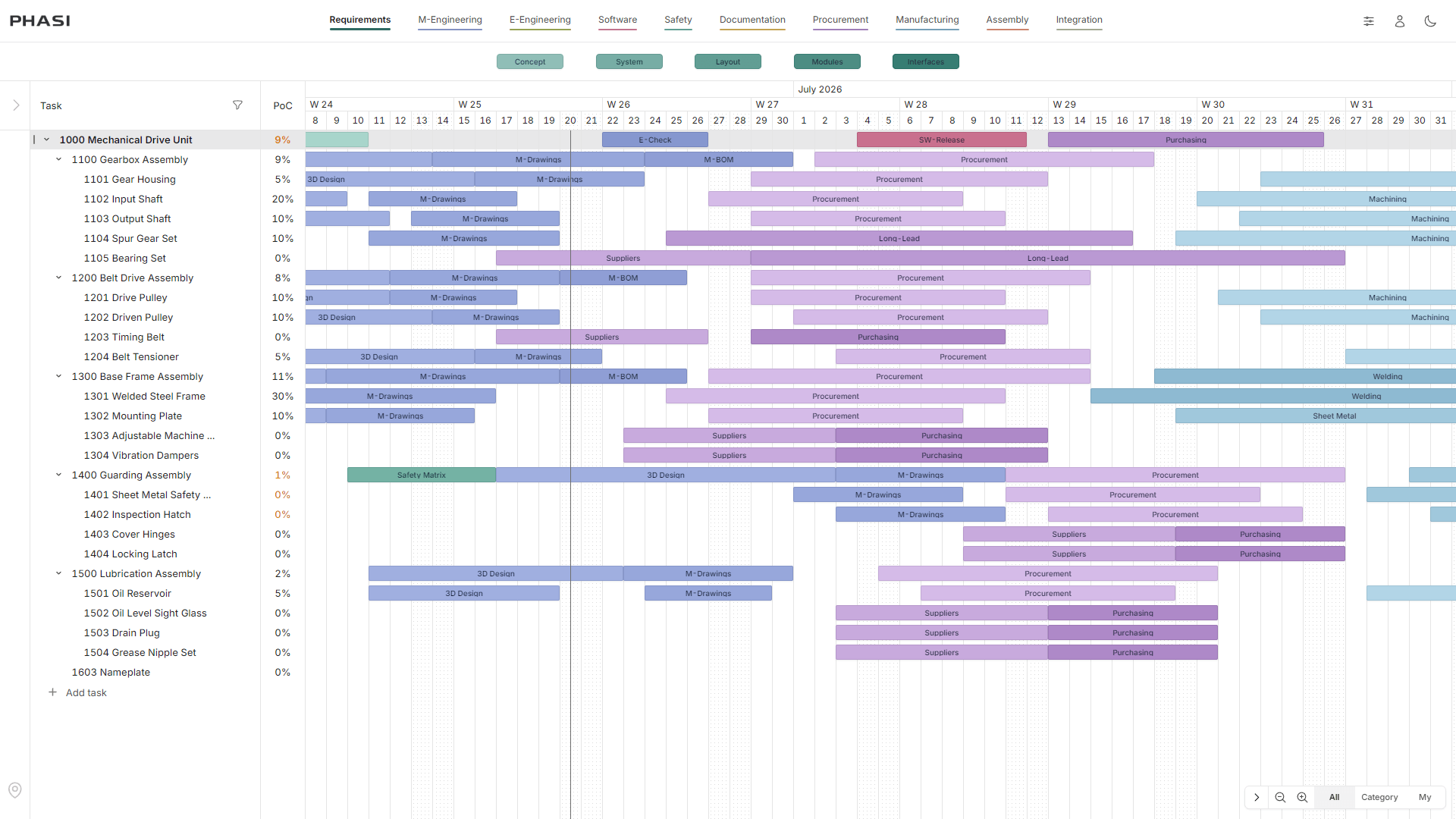
PHASI uses a PBS-style product hierarchy as the foundation of its planning model. Relevant work phases are attached to its components and assemblies and displayed as bars on a shared timeline.
In the example:
- The Pump remains in one place within the product structure.
- Engineering, Procurement and Testing are associated with that Pump.
- The Valve is not assigned an unnecessary Manufacturing phase.
- The parent Hydraulic System can have its own Manufacturing phase.
- Work remains connected to product elements while being planned over time.
PHASI describes this as PBS with WBS work layers. It does not mean maintaining two unrelated product trees. It means treating the product structure as the backbone and associating the required work with its elements.
The PHASI features page shows how project items, phase bars, comments and calculated completion appear in the actual planning interface.
Two useful perspectives on the same project
During a product-focused review, the project manager can navigate from Custom Machine to Hydraulic System and then to Pump. The important question is: What remains to be done for this element?
During a discipline-focused discussion, the team might instead ask: Which procurement phases are still open across the machine?
Neither question should require reinventing the product structure. The central requirement is that every work phase retains its explicit association with the relevant product element.
Turn completed phases into a calculated progress signal
PHASI also links work execution with Calculated Percent of Completion (PoC). According to its published methodology, completed relevant phase bars contribute to an element’s completion through configured phase-category weights. Results are rolled up through the product hierarchy.
That makes progress traceable to a planning model rather than a percentage entered independently of the work.
There are limits to what this number means. Calculated PoC is a model-based progress measure. It is not automatically the same as financial Earned Value, confirmed physical acceptance, material availability or a prediction of project finish dates. Its usefulness depends on the quality of the phases, weights and updates maintained by the team.
See the PHASI calculation methodology for the published formula and aggregation rules.
A practical setup sequence for a custom machinery project
A productive planning workflow can start with six decisions:
- Identify the deliverables. Define the machine, main systems and assemblies that need to be reviewed.
- Choose the right level of detail. Not every screw belongs in the project plan. Create items where separate dates, responsibilities or status checks are meaningful.
- Assign relevant work. Connect Engineering, Procurement, Manufacturing, Assembly or Testing phases only where needed.
- Place work on the timeline. Record its planned time window and review how work across different assemblies overlaps.
- Update the real phase status. Keep discussions and status changes tied to the appropriate element and work phase.
- Review readiness at multiple levels. Examine open phases on the component, assembly and overall-project levels.
This does not remove the need for technical decisions, dependencies or project-controls discipline. It gives those decisions a consistent product and work context.
What to look for in project planning software for machinery
When evaluating an engineering planning solution, ask practical questions rather than comparing hundreds of checkboxes:
- Can I retain the machine’s product hierarchy while viewing its work phases?
- Can purchased parts, engineered parts and assemblies have different phase sets?
- Can work at the assembly level coexist with work on its components?
- Are planned dates and phase states associated with specific product elements?
- Can project progress be traced back to completed phases?
- How much configuration or manual reconciliation will be needed every week?
ERP can remain responsible for orders, stock and financial processes. PLM/PDM can manage engineering data and revisions. CAD remains the design environment. PHASI does not claim to replace these systems; it focuses on the connected planning layer between product structure, work phases, timeline and calculated completion.
Conclusion: plan the product and the work together
Custom machinery is delivered as assemblies and components, while the work is performed by multiple disciplines over time. A good plan needs to serve both realities.
The PBS shows what is being built. Work phases show what needs to happen. Bringing them together makes it easier to discuss execution within the context of the actual product.
For a closer explanation of the terminology, read PBS vs. WBS in Engineering: Differences and Practical Integration. For a deeper description of the model, explore the PHASI Engineering-to-Order methodology.
Would you like to discuss one of your own project structures? Request a PHASI demo.